A free squarified-treemap component
for Delphi and the VCL
What is TreeMap?
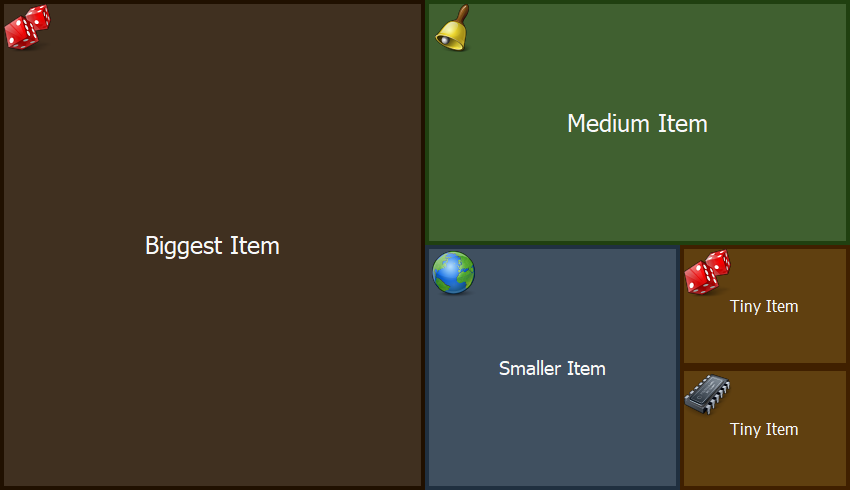
TreeMap is a free VCL component for Delphi that displays a list of weighted items as a treemap. A treemap turns a set of values into a block of nested rectangles, where each rectangle's area is proportional to the weight of the item it represents. It is a compact way to show how parts relate to a whole — which items dominate and which are barely there — without axes, legends or scrolling.
The component uses the squarified variant of the algorithm. Instead of slicing the surface into thin strips, it keeps every rectangle as close to square as it can, so the tiles stay easy to read, label and click, even when their weights differ widely.
It is self-contained in a single Delphi unit and pulls in no third-party libraries. It handles the layout and the painting, tracks mouse hovering and selection, can nest a treemap inside any item, and lets you take over the drawing when you want a look of your own. There is nothing groundbreaking here — just a small, focused component, free for anyone to drop into their own projects.
Docs / Reference
Check out the documentation here:
Getting started
Drop the component onto a form, or create it from code, and add items. Each item takes a weight, which drives its area, and a caption:
MyTreeMap := TTreeMap.Create(Self);
MyTreeMap.Parent := Self;

MyTreeMap.Items.Add(TTreeMapItem.Create(100, 'Biggest Item'));
MyTreeMap.Items.Add(TTreeMapItem.Create(40,  'Medium Item'));
MyTreeMap.Items.Add(TTreeMapItem.Create(10,  'Small Item'));
The component lays the items out and repaints on its own. When adding a large number of items at once, wrap the calls between BeginUpdate and EndUpdate to hold off redrawing until you are done — the same pattern you know from TListBox and other standard controls.
Customization
A built-in painter styles each tile from the item's own colors and a few component-level properties:
MyTreeMap.BorderSize      := 4;
MyTreeMap.BackgroundColor := clWhite;
MyTreeMap.SelectionColor  := clHighlight;
When that is not enough, handle the OnDrawItem event and paint the tiles yourself. Tiles can also carry an icon from an image list, nested items are drawn as treemaps inside their parent, and the OnClickItem and OnDblClickItem events tell you which tile the user picked.
Download
TreeMap is free to use.
Grab the package, or browse the source on GitHub.